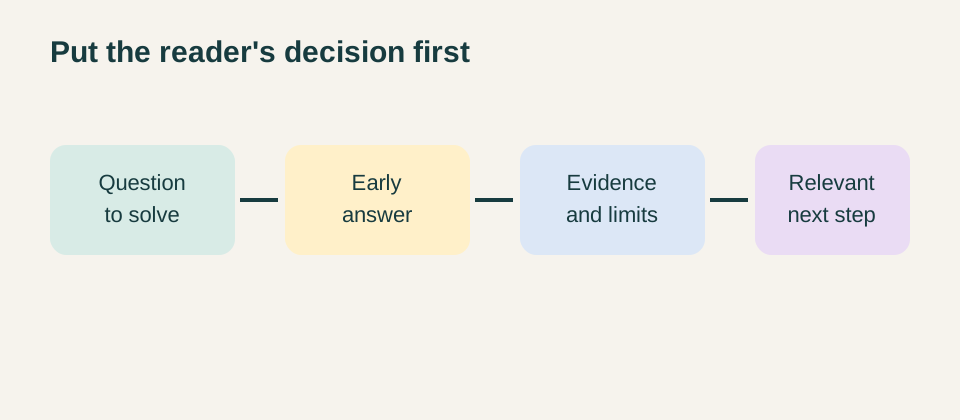
Helpful blog posts answer the reader's immediate question before asking for attention, trust, or a sales conversation. Start by naming the decision the reader is trying to make, give a usable answer in the opening, explain the limits of that answer, and only then point to a relevant service or next step. This order respects the reader's time and gives a small business a better test for whether a topic deserves to be published.
A blog is not helpful because it is long or because it repeats familiar advice. It becomes helpful when someone can use it to prepare for a conversation, compare approaches, avoid a foreseeable mistake, or understand what information they are missing. That is a higher standard than filling an editorial slot. It also makes promotional language easier to judge: if removing the sales paragraph leaves the article useful, the article is doing its job.
Begin with the question behind the search
Writers often receive a keyword, a service name, or a broad category such as marketing. None is yet a reader question. Translate the starting phrase into the situation that brought a person to the page. Someone searching for how to write helpful blog posts may be trying to plan a first article, repair content that feels generic, or explain a specialist service without making claims they cannot support. These needs lead to different drafts even when the keyword is the same.
Write one sentence that describes the job of the page: “Help a service-business writer turn a real customer question into a clear, careful article.” Keep that sentence beside the draft. It prevents the familiar drift from practical guidance into a list of broad statements about content. The Google Search Central guidance on helpful content similarly frames useful material around a real audience and a clear purpose, rather than content made mainly to attract visits.
Use evidence from the work, not imagined personas
The best starting material is usually already close to the business: questions from discovery calls, repeated email replies, proposal clarifications, onboarding notes, support messages, and internal handoffs. Record the question in the language people actually use. “What should we have ready before a website redesign?” gives an author a concrete promise. “Why websites matter” does not. If the source is confidential, keep the decision and remove the identifying details.
A useful question is specific enough to answer but broad enough to apply beyond one person. If it only makes sense with private account information, do not turn it into an article. If it is too broad, split it into a sequence. The reader should be able to recognise the situation in the first few paragraphs without being told that every business is different.
Give the answer early, then earn the detail
Open with the short answer, not a history of the topic. For example, a practical introduction to a content process might say that a strong post identifies one reader decision, explains the evidence needed, and links to the next relevant action. The rest of the article can show how to do that. This approach is not about making the page shallow. It gives a busy reader a reason to continue and makes the article easier to scan when they return later.
After the opening answer, explain the choices that change the recommendation. A writer may need to treat a time-sensitive question differently from a lasting one. A technical subject may need expert review. A comparison may need clear criteria and a statement of what the article cannot decide for the reader. The point is to provide judgment, not to hide the answer behind a long introduction.
Choose a narrow promise that the article can keep
A clear promise protects both the reader and the writer. “A guide to better marketing” is too wide to verify. “How to decide whether a service page needs clearer proof of process” gives the article boundaries. The author can cover the reader's starting point, the information to examine, reasonable actions, and situations where outside help is appropriate. They do not need to pretend to solve every marketing problem.
Test the promise against the service. A business should only publish advice that it can explain honestly and review competently. The Vedam Vision services pages are a useful example of a destination to check before linking. If a post leads to a service, the service page should genuinely provide a next step related to the subject. Do not use a blog article to imply a capability the business does not offer.
State limits as part of the answer
Limitations are often the most valuable part of a helpful post. A content plan cannot repair an unclear offer. A checklist cannot replace a legal review. A website recommendation may depend on technical constraints that are not visible in a public article. Say so plainly. This helps a reader decide whether they can act independently, gather more information, or arrange a discussion with the right person.
Limits also keep the writing credible. Avoid universal promises such as “this will increase conversions.” Instead, describe the condition: a clearer page can make it easier for a buyer to find the information they need, but the final result still depends on the offer, the audience, the traffic source, and the quality of the rest of the journey. That is more useful than a neat claim with no evidence behind it.
Build the body around decisions, not empty headings
Every main section should move the reader toward a practical decision. A section on sources can help them decide whether a claim is safe to publish. A section on structure can help them decide what belongs in the opening. A section on links can help them decide where a reader should go next. Before keeping a heading, ask what action or understanding it produces. If the answer is only “it adds length,” remove or rewrite it.
Concrete examples can be hypothetical without becoming invented case studies. You might explain that a design studio could answer “What should we prepare before a brand review?” by listing the materials, decisions, and limitations involved. Make it clear that this is an illustrative workflow, not an outcome from a client engagement. The distinction matters. It lets the article teach without borrowing credibility it has not earned.
Use sources when the reader needs to verify a claim
Not every sentence needs an external citation. The writer's explanation of a workflow or editorial choice can stand as informed guidance. Sources matter when the article refers to a changing platform feature, a rule, a standard, a statistic, or a claim that a careful reader may want to inspect. Prefer the organisation that owns the guidance, and record when it was checked. Do not cite a secondary summary when the primary document is available.
For content quality, Google's own documentation is more suitable than an unattributed list of ranking tips. For general small-business marketing context, the U.S. Small Business Administration marketing and sales guide provides a public reference point. Neither source turns a page into a guarantee. They support a careful explanation of why reader needs, a clear offer, and a maintained customer path deserve attention.
Link as a reader route, not an SEO obligation
Internal links are useful when they continue the decision already underway. A reader who needs to see how a project is approached can visit the Vedam Vision process. Someone assessing a broader digital need can review the portfolio or the case study library. A link should say what the destination contains. “Read more” gives the reader no reason to choose it.
Check links before publication. A working address is not enough if the page no longer supports the anchor text. Use links sparingly enough that the main article remains readable, and do not make an ordinary article feel like a navigation menu. If the next step is a conversation, the contact route or a free digital audit should appear only when it fits the question the article has already addressed.
Introduce the service after the reader has enough context
Promotion works best as a helpful bridge. After explaining the decision, state what a specialist service can contribute that the article cannot: review of the current situation, access to subject knowledge, implementation capacity, or a structured process. For a post about operational content systems, it may be relevant to link to AI solutions and automation work. The article should not suggest that a tool is the answer to every content problem.
Keep the invitation modest. A reader may be ready to apply the advice alone. They may need more evidence first. Or they may need help because their situation is constrained by time, data, approvals, or a complex customer journey. The call to action should recognise those possibilities. It should not turn a practical article into a disguised sales page.
Review the draft like a reader with limited time
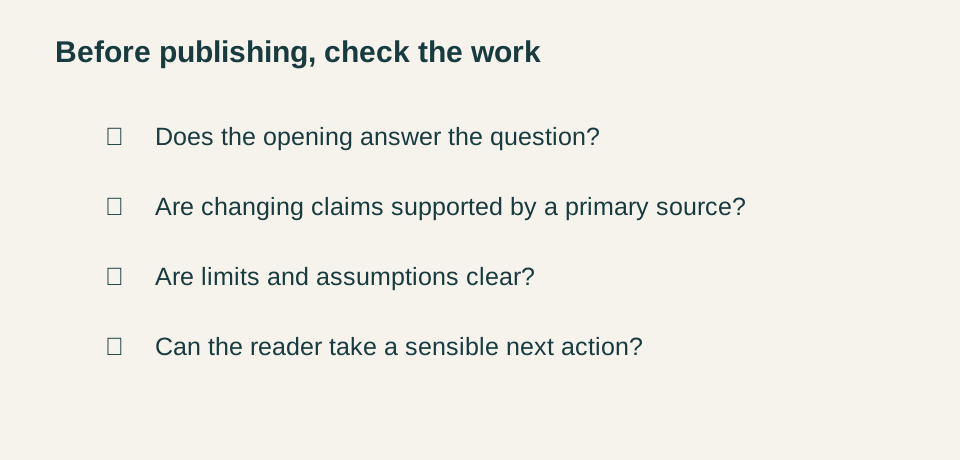
Before publishing, read the introduction alone. Does it answer the question? Then scan the headings. Do they make a logical route through the topic? Check every factual statement that could change, every link, and every example that could accidentally sound like a client result. Read for repeated phrases and generic transitions. If three sections could swap places without changing meaning, the draft may still be organised around a template rather than the actual problem.
Ask a final practical question: what can the reader do after this page? They might prepare a list of questions, check an existing page, collect source material, or decide that the topic needs specialist input. A good post makes that next action clearer. It does not need to tell a dramatic story or promise a result to be useful.
Conclusion: put help before promotion
How to write helpful blog posts comes down to a disciplined order: find a real question, answer it early, explain the decisions and limits, support changing claims with primary sources, and link to services only when they genuinely help the reader continue. This creates content that respects attention and gives a business a more credible foundation for future conversations.